
Ticket settings

Use Ticket settings to control the shared ticket lifecycle and intake behavior for your agency. This page covers the general configuration that is not already documented in the focused inbox, routing, and reply-template guides.
Who this is for
Section titled “Who this is for”Agency team members who manage ticket configuration. Requires Manage Ticket Settings.
Open General ticket settings
Section titled “Open General ticket settings”Open Settings, then Tickets, then General ( /settings/tickets (opens in new tab) ).
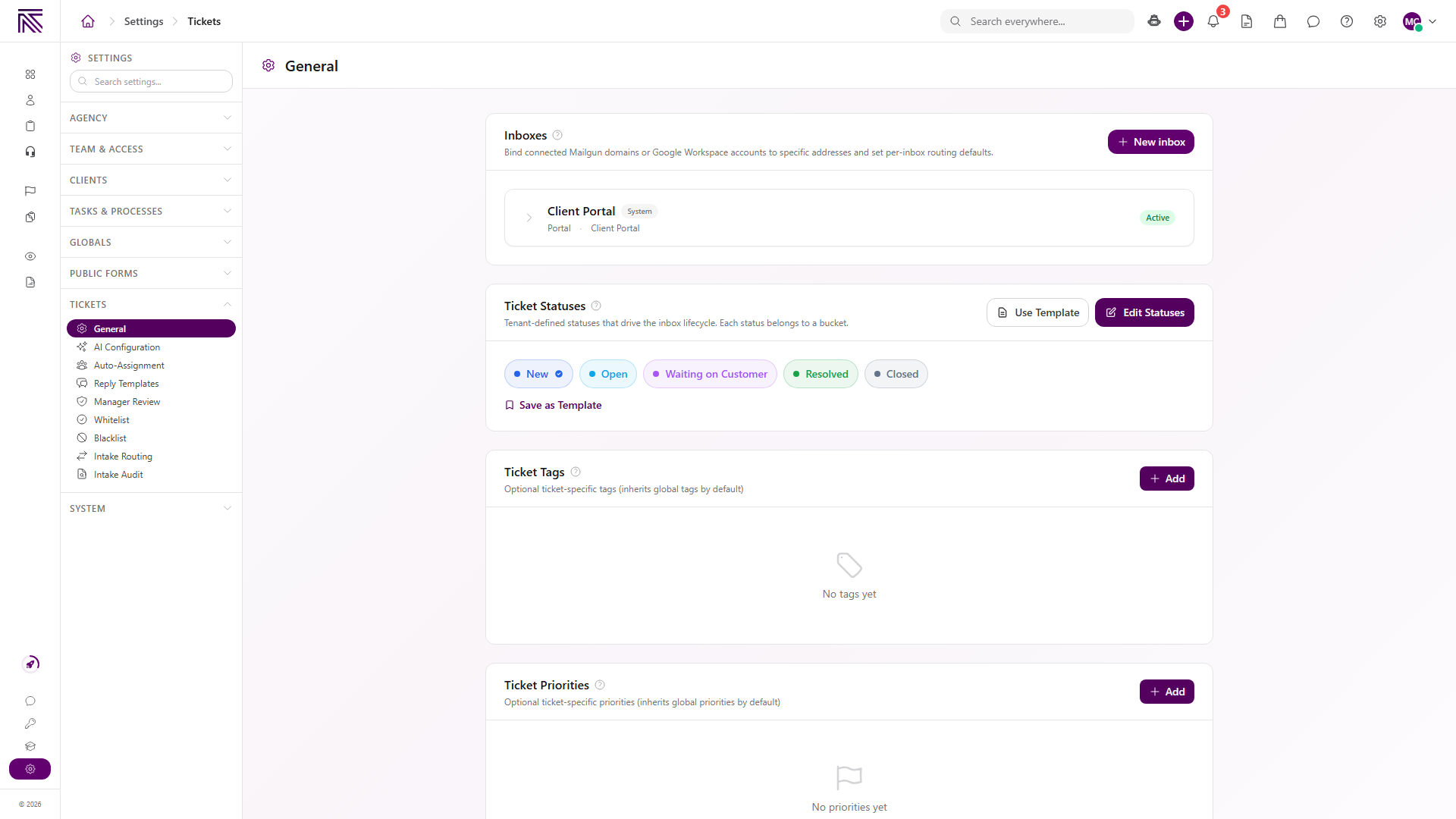
The page combines these settings:
| Section | What it controls |
|---|---|
| Inboxes | Connected message channels and the system Client Portal inbox. |
| Ticket Statuses | Agency-defined statuses organized into lifecycle buckets. |
| Ticket Tags | Optional ticket-specific tags, which inherit global tags by default. |
| Ticket Priorities | Optional ticket-specific priorities, which inherit global priorities by default. |
| SLA Defaults | First-response and resolution targets for each enabled priority. |
| Ticket Lifecycle | Automatic closure and waiting-on-client timing. |
Configure ticket statuses, tags, and priorities
Section titled “Configure ticket statuses, tags, and priorities”- Under Ticket Statuses, select Edit Statuses to change the available status set.
- Select Use Template to apply an existing status template.
- Select Save as Template to preserve the current status configuration for reuse.
- Under Ticket Tags or Ticket Priorities, select Add to create a ticket-specific option when the inherited global options are not enough.
Each ticket status belongs to a lifecycle bucket. The visible defaults include New, Open, Waiting on Client, Resolved, and Closed, but your agency can use a different configured set.
Configure SLA defaults and lifecycle timing
Section titled “Configure SLA defaults and lifecycle timing”Scroll down on General to SLA Defaults and Ticket Lifecycle.
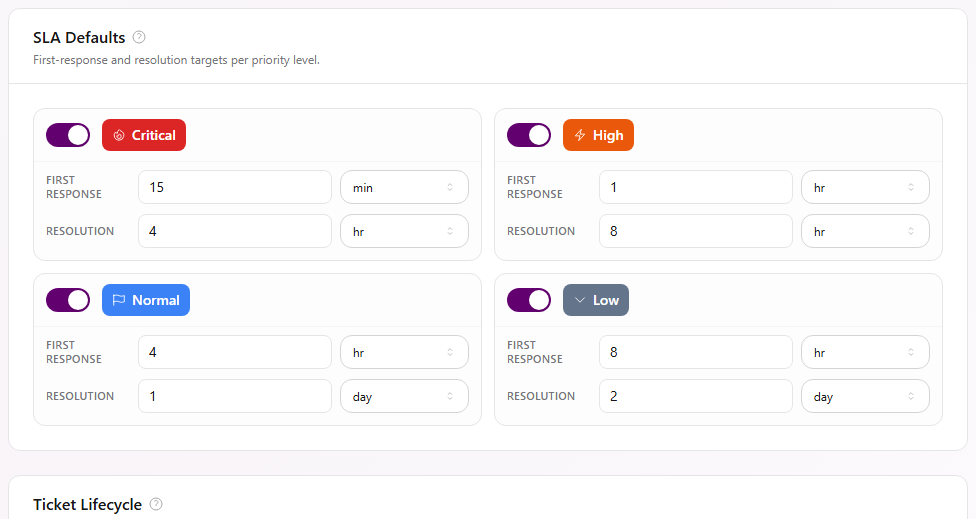
- Enable the priorities that should have SLA targets, then set a First response and Resolution duration for each one.
- Turn on Enable automatic ticket closure when resolved and waiting tickets should move through the lifecycle automatically.
- Turn on Use business days when lifecycle timing should use the agency schedule. The page falls back to calendar days when no agency schedule is configured.
- Set how long a resolved ticket waits before it closes automatically.
- Set when AgencyTitan sends a waiting-on-client reminder and when it automatically resolves the ticket if no reply arrives.
- Select Edit Reminder Email to review the reminder content.
Changes on this part of the page save automatically.
Continue to focused setup guides
Section titled “Continue to focused setup guides”These ticket settings already have complete step-by-step guides:
- Set up a ticket inbox for connected email or SMS channels, visibility, defaults, and inbound or outbound behavior.
- Create intake routing rules for routing brand-new email tickets by sender, subject, client match, and arrival inbox.
- Create reply templates for shared responses that team members insert from the ticket composer.
The Ticket settings sidebar also exposes other configuration areas when your permissions and agency setup make them available. Use the focused page for the setting you intend to change.
Expected result
Section titled “Expected result”- Ticket statuses, tags, and priorities show the agency’s intended options.
- Enabled SLA defaults show the correct first-response and resolution targets.
- Automatic lifecycle controls use the timing and business-day choice you selected.
- Existing inbox, routing, and reply-template setup remains available through its focused settings page.
Troubleshooting
Section titled “Troubleshooting”| Symptom | Likely cause | What to do |
|---|---|---|
| Tickets is missing from Settings | You lack Manage Ticket Settings | Ask an owner to review your ticket settings permission |
| A status is missing from a ticket | It is not in the configured status set | Open Ticket Statuses and review the current statuses and buckets |
| A tag or priority is missing | The option is neither inherited globally nor added for tickets | Review Ticket Tags, Ticket Priorities, and the corresponding global setting |
| SLA timing is not shown for a priority | That priority’s SLA switch is off | Enable it and enter first-response and resolution targets |
| Business-day timing is unexpected | The agency schedule is not configured | Review the agency schedule or use calendar days |
| A new email ticket enters the wrong inbox | General lifecycle settings do not control intake routing | Review Create intake routing rules |
Related articles
 Concept Settings overview Find AgencyTitan settings and understand how agency, ticket, process, notification, and personal controls fit together.
  Concept Tickets overview How the Tickets inbox, ticket conversations, assignment, statuses, inboxes, routing rules, and reply templates fit together.
  How-to Set up a ticket inbox Connect an email or SMS channel in ticket settings and configure visibility, defaults, inbound behavior, and outbound behavior.
  How-to Create intake routing rules Route brand-new email tickets by sender, subject, known-client match, and arrival inbox using ordered ticket intake rules.
  How-to Create reply templates Create shared ticket reply templates with formatted content and shortcodes, then insert active templates from the ticket composer.
  How-to Assign and update a ticket Change ticket status, priority, assignees, client, department, tags, privacy, and inbox from the ticket view.