
Chat overview

Chat is internal messaging for your agency team. Use it to talk with teammates in a channel or a direct message. It does not replace a ticket, and client portal contacts cannot see it.
Who this is for
Section titled “Who this is for”Agency team members granted View Chat. Sending a message or starting a direct message also requires Send Chat Messages. Creating a named channel requires Manage Chat Channels. Owners and Admins have full access.
Open Chat
Section titled “Open Chat”- Sign in to the agency app.
- Open Chat ( /chat (opens in new tab) ), or select the header Chat control and then Open full chat.
- On a wide screen, the Conversations list stays on the left. On a narrower screen, open that list from the menu control.
The left list header reads AgencyTitan Chat. When nothing is unread, it shows Everything is caught up.
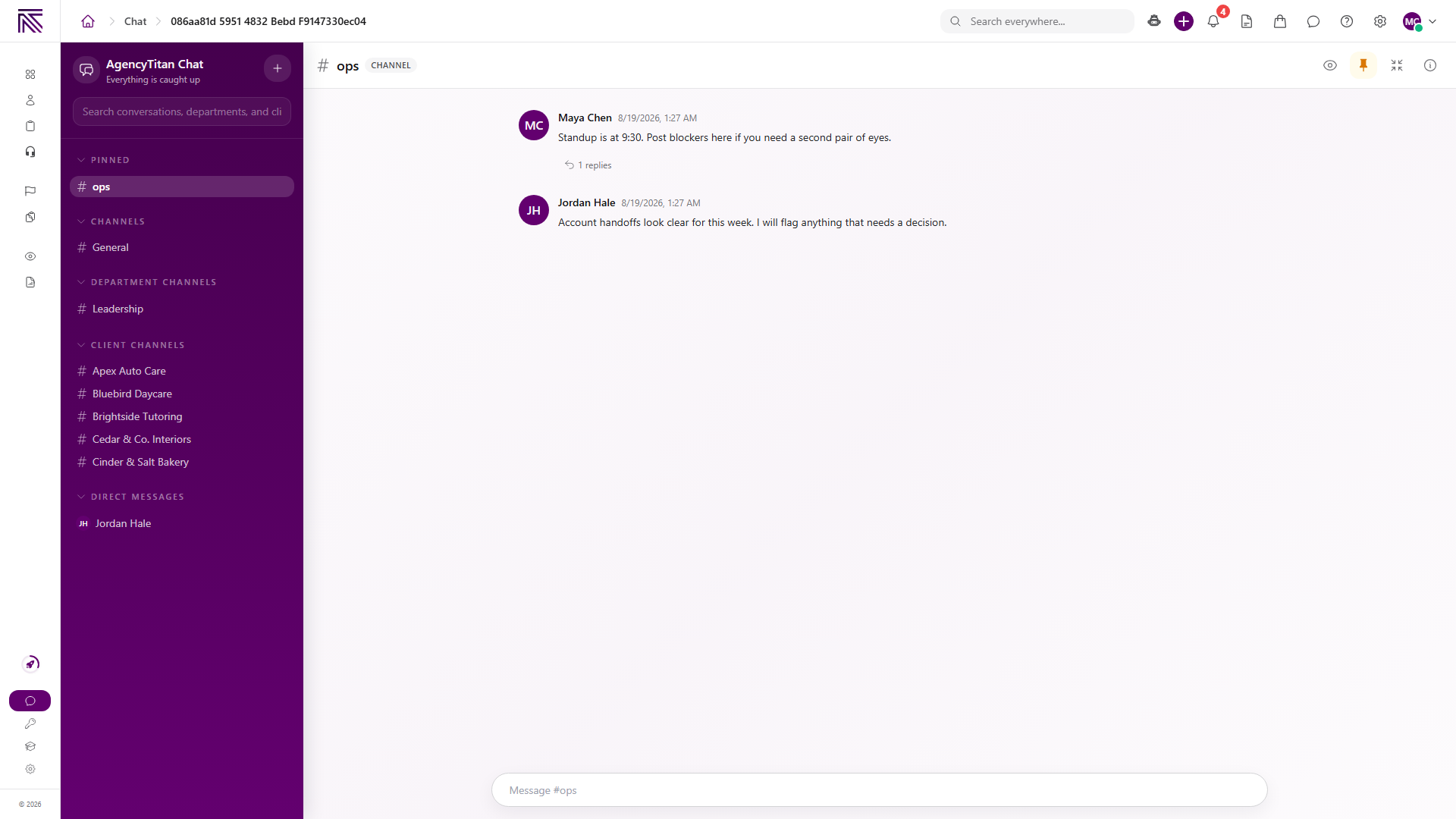
How conversations are organized
Section titled “How conversations are organized”| Area | What it is for |
|---|---|
| Search conversations, departments, and clients | Find a conversation, department, or client by name. |
| Pinned | Conversations you pinned for yourself. |
| Channels | Named channels your team created. |
| Department channels | One conversation per department you can see. |
| Client channels | One conversation per client you can see. |
| Direct messages | One-to-one conversations with a teammate. |
The plus control opens New Conversation. Choose Direct message or Channel.
An open conversation shows a type badge: Channel, DM, Department, or Client.
Department and client rows can appear before anyone has sent a message. Selecting one opens that conversation.
Chat versus a ticket versus the portal
Section titled “Chat versus a ticket versus the portal”| Surface | What it is |
|---|---|
| Chat | Internal team messages. Work them in Chat. |
| Ticket | An incoming request or customer conversation. Work it in Tickets. |
| Client portal | What an external contact can see for a linked client. |
A Client conversation in Chat is still internal. It is the same surface as the Channel tab on a client record. Portal users do not see those messages.
Chat does not create a ticket. A ticket reply does not appear in Chat.
What you can do in a conversation
Section titled “What you can do in a conversation”When a conversation is open you can:
- Send a message from the composer. An empty channel shows Start the channel.
- Attach files from the composer or by dropping them on the timeline.
- Watch a named channel, or unwatch it, from Watch channel / Unwatch channel.
- Pin or unpin the conversation for yourself.
- Open Conversation details to see Members.
- Reply in a Thread to keep a side discussion off the main timeline.
- Use Minimize to popup to keep the conversation in a smaller window.
The header launcher also has Recent, DMs, Channels, and Online, plus New DM.
Guides in this category
Section titled “Guides in this category”Related articles
 Concept Welcome to AgencyTitan Sign in, find the main areas of the agency app, and choose a first-week path.
  How-to Start a conversation Open Chat, start a direct message or named channel, send a message, and pin or watch a conversation.
  Concept Tickets overview How the Tickets inbox, ticket conversations, assignment, statuses, inboxes, routing rules, and reply templates fit together.
  Concept Clients overview Understand the Clients list, client record anatomy, Client Profile templates, Info Sheets, notes, programs, tasks, and tickets.